
AI email triage in n8n: every Gmail message sorted, with a reply draft waiting
A busy inbox mixed client emails with promotions and sales pitches, and every reply started from a blank page. We built an n8n workflow that sorts each new email as it arrives and writes a draft reply for the right category, which a person reviews before sending.
- Client
- Small business, busy Gmail inbox
- Platform
- n8n
- AI
- OpenAI text classifier + reply model
- Output
- Gmail drafts, never auto-sent
The email triage problem
Client emails, supplier messages, promotions and cold pitches all arrived in the same inbox. Important messages got buried, and the team spent time writing similar replies over and over.
The client wanted help with replies but didn't want AI sending emails on its own. A person had to stay in control of what went out.
How the n8n email triage workflow works
- 01
Gmail trigger
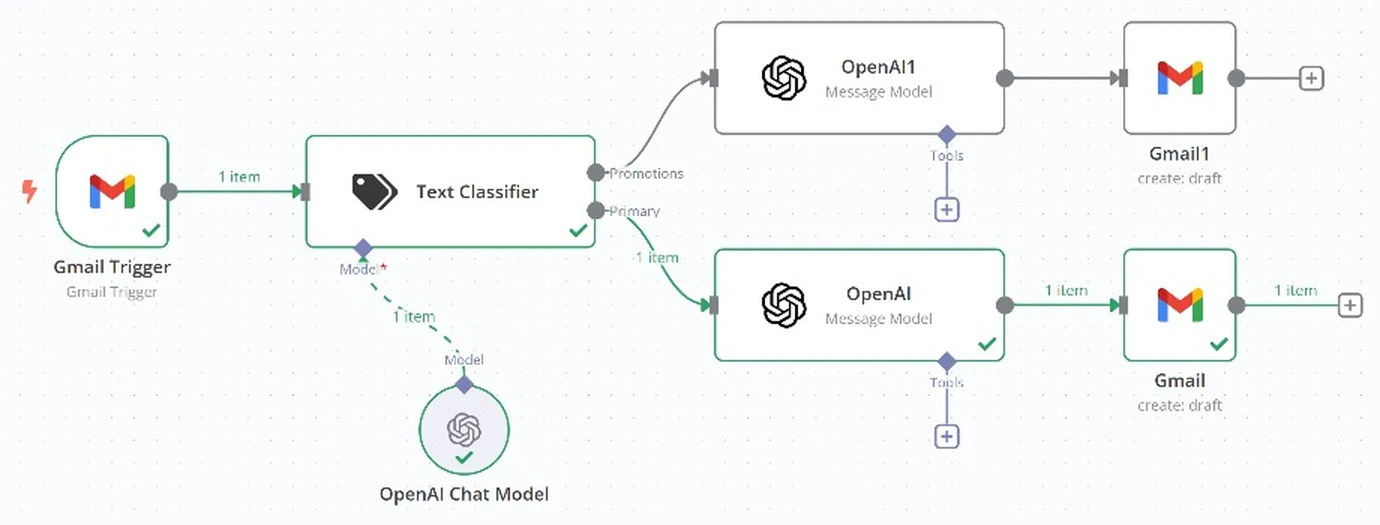
The workflow picks up each new email as it arrives in the inbox.
- 02
AI text classifier
An n8n Text Classifier with an OpenAI model sorts each message into a category: primary messages that need a real reply, or promotions.
- 03
A reply prompt per category
Each category has its own OpenAI step with its own instructions, so every type of email gets a reply written in the right tone.
- 04
Draft, don't send
The reply is saved as a Gmail draft. Nothing is sent until a person reviews it and clicks send.
- 05
Room to grow
New categories, such as invoices or support requests, can be added as new classifier outputs with their own reply instructions.
What changed in the inbox
- Every new email is classified on arrival, so primary messages stand out from promotions.
- Replies start from a ready draft instead of a blank page.
- A person still approves every email before it's sent.
- Each category's tone and rules live in one prompt, so they're easy to adjust.
What should your business stop doing manually?
Tell us what slows your team down. We'll show you what can be automated.