
Catalog Ops: Shopify bulk edit, bulk import and export
Catalog Ops lets you import, export and bulk-update Shopify products, variants, prices, inventory and tags from a spreadsheet. Every change is validated and previewed before it goes live, and every import can be rolled back.
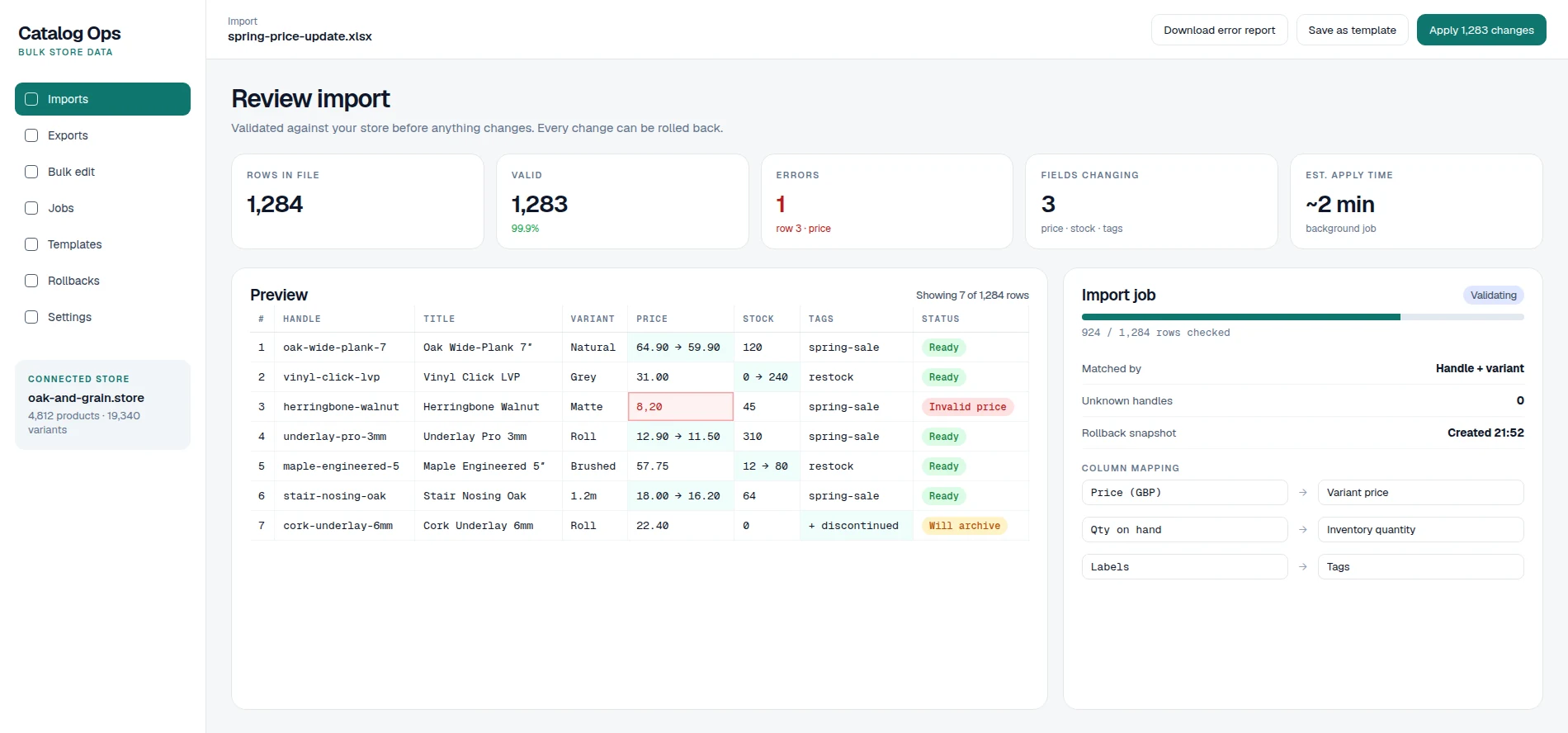
Bulk Shopify changes you can preview and undo
Supplier price lists, seasonal sales and stock updates all mean changing hundreds or thousands of products at once. Shopify's built-in CSV import works, but one wrong column can overwrite prices or inventory across the store, and there is no simple undo.
Catalog Ops makes bulk changes safe. Upload an Excel or CSV file, map its columns to Shopify fields once and save the mapping for next time. Every row is validated before anything changes, so invalid prices, unknown handles and missing variants are caught in the preview instead of on your live store.
You see exactly which fields will change before you apply them, and every import takes a snapshot you can restore in one click. Export the catalog to a spreadsheet, edit it in bulk and re-import, for products, variants, prices, compare-at prices, inventory, tags and metafields.
The problem
- 01Bulk product updates in Shopify are slow and error-prone.
- 02One bad CSV can break prices or stock across the store.
- 03There's no easy way to undo a bulk change.
Shopify bulk edit features
- 01
Spreadsheet imports
Upload XLSX or CSV files and map columns to Shopify fields.
- 02
Validation
Errors such as invalid prices or unknown handles are caught before anything changes.
- 03
Preview
See exactly which fields will change before you apply them.
- 04
Rollback
Every import creates a snapshot you can restore in one click.
- 05
Exports and bulk edit
Export the catalog, edit it in a spreadsheet and re-import.
- 06
Saved templates
Save column mappings for recurring supplier and price updates.
Works with
- Shopify
- Excel
- Google Sheets
- CSV
Who it's for
- Shopify merchants with large catalogs.
- Brands that update prices and stock from supplier files.
- Agencies managing client stores.
Shopify bulk edit FAQs
Which fields can I update?
Products, variants, prices, compare-at prices, inventory, tags, metafields and more.
What happens if an import has errors?
Rows with errors are flagged in the preview and skipped, and you can download an error report to fix them.
Can I undo an import?
Yes. Every import can be rolled back to the snapshot taken before it was applied.
How is it different from Shopify's own CSV import?
Catalog Ops adds column mapping, validation before changes are applied, a field-by-field preview, saved templates and one-click rollback.
Does it work with large catalogs?
Yes. It is designed for stores with large catalogs and many variants, and works within Shopify's API limits.
What should your business stop doing manually?
Tell us what slows your team down. We'll show you what can be automated.